📄 CV Forge AI - AI-Powered Resume Builder
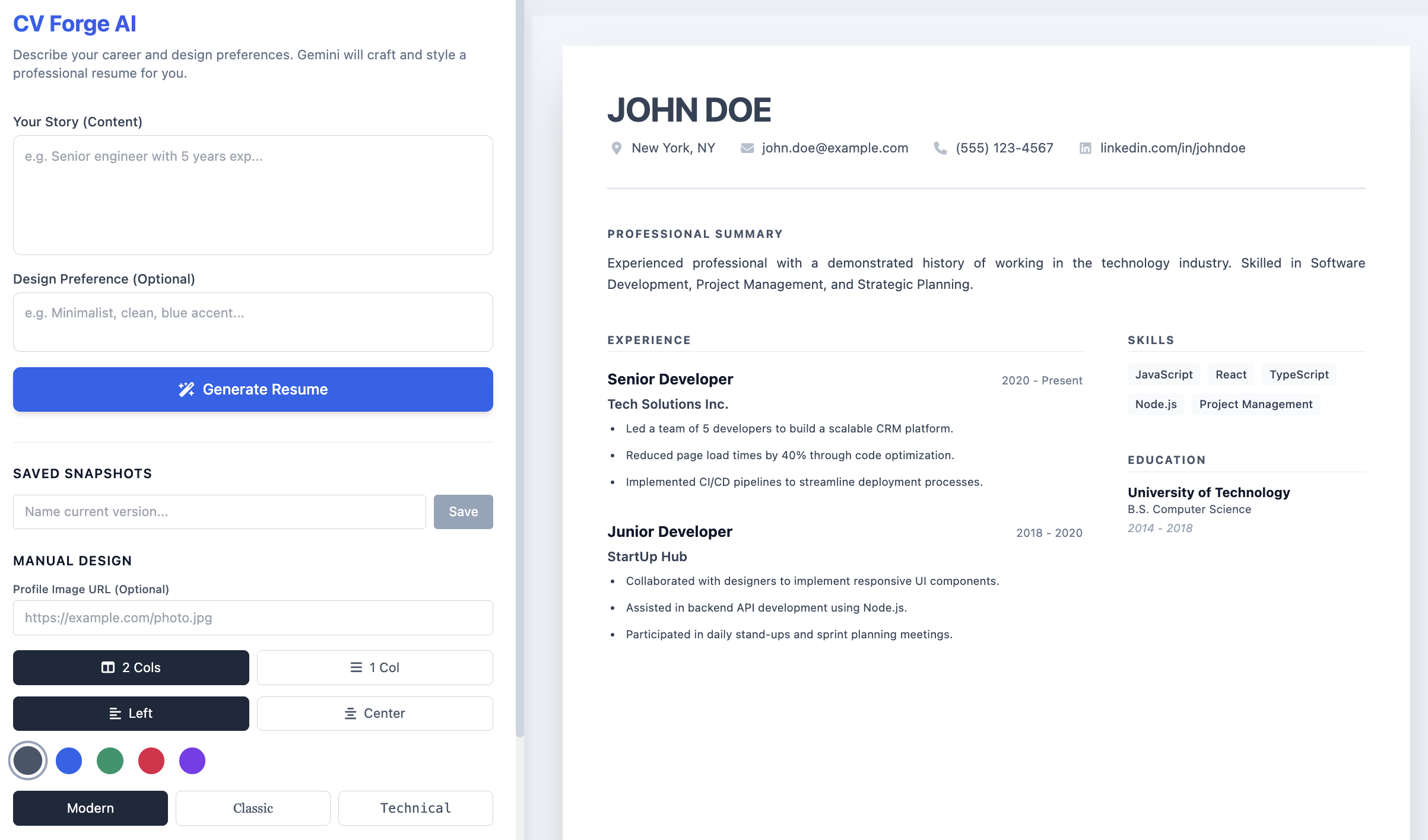
CV Forge AI is a powerful web application that transforms natural language descriptions into professional, formatted PDF resumes. Powered by Google's Gemini 2.5 Flash, it allows users to simply describe their career history and design preferences to instantly generate a structured, aesthetically pleasing curriculum vitae.
🌟 Key Features
🤖 AI-Powered Generation
Creating a professional resume has never been easier. Simply type your career history in natural language - for example, "Senior engineer with 5 years at Google working on cloud infrastructure" - and the AI automatically structures it into a complete, well-organized resume. The intelligent system goes beyond just formatting text; it suggests optimal layouts, fonts, and color schemes based on your description. If you mention "Make it look technical," the AI will select a monospace font and minimal layout that reflects a tech-focused aesthetic.
🎨 Visual Customization
Personalize your resume with extensive customization options. Choose between Single Column layouts for a traditional linear format or Two Column layouts with a sidebar for a modern look. Select from professionally curated color themes including Slate, Blue, Emerald, Rose, and Violet to match your personal brand. Typography options range from Modern (Inter) for contemporary appeal, Classic (Merriweather) for traditional elegance, or Technical (Roboto Mono) for a developer-focused style. Toggle header alignment between Left and Center, and control the visibility of specific sections like Summary, Experience, Projects, Education, and Skills with a simple click. You can even add a profile image by providing a URL to display your professional headshot.
💾 Data Management
Your resume data is always under your control. Export high-quality, A4-formatted PDFs ready for printing or digital submission. Save your resume data as JSON files to your local storage and restore them anytime, making it easy to maintain multiple versions. The snapshot feature allows you to save different versions of your resume within the browser's local storage, enabling you to switch between drafts instantly without losing any work.
💡 How to Use
Creating Your Resume
Start by entering your career story in the "Your Story" text box. You can paste your LinkedIn bio, type out your work history, or describe your professional experience in your own words. The more detail you provide, the better the AI can structure your resume.
Customizing the Design
Optionally, describe how you want your resume to look in the design preferences field. For example, you might say "Clean and blue with a modern feel" or "Professional and minimal with a technical vibe." The AI will interpret your preferences and apply appropriate styling.
Generating and Refining
Click the "Generate Resume" button and watch as the AI transforms your description into a structured resume. Once generated, use the manual controls to fine-tune colors, fonts, layout options, or toggle specific sections on and off until you achieve the perfect look.
Downloading Your Resume
When you're satisfied with the result, simply click the "Download PDF" button to get your professionally formatted resume as a high-quality PDF file, ready to send to employers or upload to job boards.
🛠️ Tech Stack
CV Forge AI is built with modern web technologies to ensure a smooth, responsive experience:
- Frontend: React 18 with TypeScript for type-safe, component-based development
- Styling: Tailwind CSS for rapid, utility-first styling
- AI: Google Gemini API (gemini-2.5-flash) for intelligent content generation
- PDF Generation: html2pdf.js for high-quality document export
- Icons: FontAwesome for professional iconography
🎯 Best Practices
For the best results, provide detailed information about your work experience, including specific achievements and responsibilities. Be descriptive in your design preferences to help the AI understand your vision. Take advantage of the snapshot feature to save multiple versions as you experiment with different styles. Regularly export your resume data as JSON files for backup purposes, ensuring you never lose your work.
🚀 Getting Started
Visit the live application and start creating your professional resume in minutes. No sign-up required - just describe your career, customize the design, and download your polished CV. Whether you're a software engineer, designer, manager, or any other professional, CV Forge AI adapts to your needs and creates a resume that stands out.
© Wai YanRSS