🧾 FlowInvoice AI - AI-Powered Invoice Generator
FlowInvoice AI is a powerful, React-based web application that leverages Google's Gemini AI to instantly generate professional invoices from natural language descriptions. Simply describe what you need - for example, "Invoice to Acme Corp for 50 hours of consulting at $100/hr" - and the AI constructs a structured, beautifully designed invoice for you.
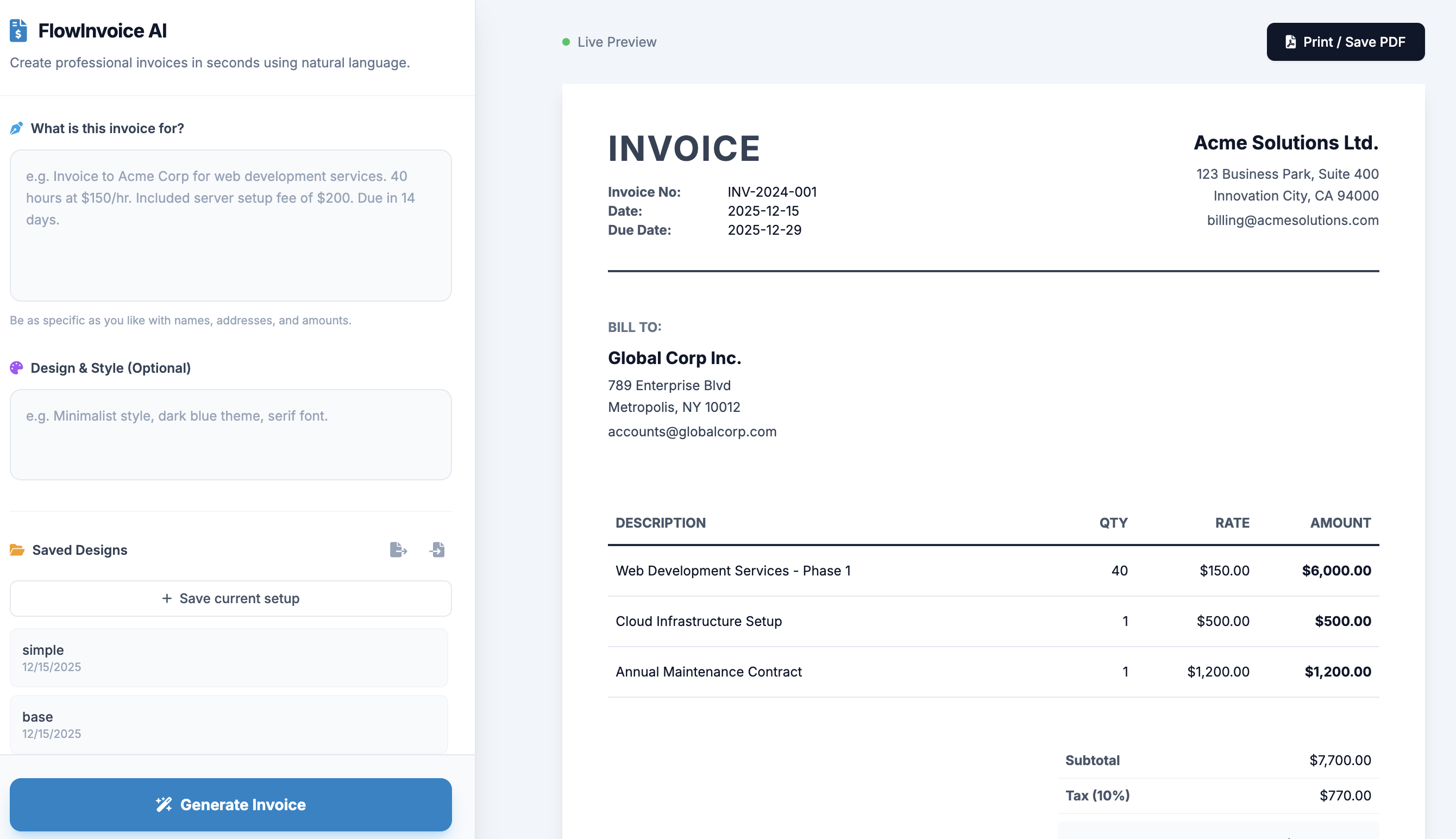
🌟 Key Features
🤖 Natural Language Processing
Creating professional invoices has never been easier. Simply describe your invoice in plain English - for example, "Bill John Doe for website redesign. Fixed price $2000. Add a domain transfer fee of $50. Tax is 5%" - and the AI automatically converts your unstructured text into a fully structured invoice. The intelligent system extracts line items, calculates totals, applies tax rates, and formats dates and addresses, all from your natural language description.
🎨 Smart Design Generation
FlowInvoice AI goes beyond just generating content - it interprets the "vibe" of your request to automatically select appropriate colors, fonts, and layouts. Mention "Tech startup" and you'll get a modern, blue, sans-serif design. Say "Professional law firm" and the AI will choose a classic, elegant style with traditional typography. The system understands design preferences and applies them intelligently to create invoices that match your brand identity.
📐 Multiple Layout Options
Choose from three professionally designed layout styles to match your business needs. The Modern layout features clean lines and contemporary styling perfect for tech companies and creative agencies. The Classic layout offers traditional formatting ideal for established businesses and professional services. The Minimal layout provides a streamlined, distraction-free design that puts the focus on your content.
💾 Template Management
Save time on recurring invoices with powerful template management features. Save your favorite invoice designs to your browser's local storage for quick reuse whenever you need them. Export your templates to JSON files for backup or sharing across devices. Import previously saved JSON designs to restore your templates on any device. This flexibility ensures you never lose your carefully crafted invoice setups.
📄 PDF Export
Generate print-ready invoices with built-in PDF export functionality. The application includes perfect print styling that allows you to use your browser's "Print to PDF" feature to create professional PDF documents. No additional software or plugins required - just click "Print / Save PDF" and download your beautifully formatted invoice.
🛠️ Tech Stack
FlowInvoice AI is built with cutting-edge web technologies to deliver a fast, reliable experience:
- Frontend: React 19 with TypeScript for type-safe, modern development
- Styling: Tailwind CSS for responsive, utility-first design
- AI Integration: Google GenAI SDK for intelligent content generation
- Icons: FontAwesome for professional iconography
📖 Usage Guide
Creating Your Invoice
Start by describing what the invoice is for in the "What is this invoice for?" text box. Be as detailed as you like - include the client name, services or products provided, quantities, prices, and any additional fees or discounts. For example: "Invoice to Acme Corporation for 50 hours of consulting services at $100 per hour, plus a $200 rush fee."
Customizing the Design
Optionally, describe your design preferences in the "Design & Style" box. You might say "Clean, minimal, dark green accent color" or "Professional and corporate with blue tones." The AI will interpret your preferences and apply appropriate styling to match your vision.
Generating and Refining
Click the "Generate Invoice" button and watch as the AI transforms your description into a complete, structured invoice. The live preview updates instantly, showing you exactly how your invoice will look. You can regenerate with different descriptions or manually adjust the layout style to fine-tune the appearance.
Saving and Exporting
When you're satisfied with your invoice, click "Print / Save PDF" to download it as a professional PDF document. If you want to reuse this setup later, click "Save current setup" in the sidebar to store it as a template. You can also export your templates to JSON files for backup or import them on another device.
💾 Data Persistence
Your invoice templates are automatically saved to your browser's local storage under the key flowInvoice_templates, ensuring they're available whenever you return to the application. For additional security and portability, you can export your templates to JSON files and import them on any device, making it easy to maintain consistent invoice designs across multiple computers or share templates with team members.
💡 Best Practices
For optimal results, provide detailed information about your invoice including client details, itemized services or products, and any applicable taxes or fees. Be specific in your design preferences to help the AI understand your brand aesthetic. Take advantage of the template system to save time on recurring invoices - create templates for your most common invoice types and reuse them with a single click. Regularly export your templates to JSON files for backup purposes, ensuring you never lose your carefully crafted designs.
🎯 Perfect For
FlowInvoice AI is ideal for freelancers, consultants, small business owners, and anyone who needs to create professional invoices quickly. Whether you're billing clients for services, selling products, or managing project-based work, FlowInvoice AI adapts to your needs and creates invoices that look polished and professional every time.
© Wai YanRSS